
What is it?
CiQ Extract allows users to process contracts which originated from a template on CreateiQ but have been negotiated and finalised outside of the platform. Users can extract structured elections for those templates, which can then be saved as a digital repository of the completed negotiations.
How do I get access?
CiQ Extract is available as part of our standard subscription at no additional charge.
It can be enabled or disabled at an organization account level for our users, who may or may not want to use this AI enabled feature!
CiQ Extract is currently trained to work with certain ISDA standard templates and is being rolled out for other agreement types based on customer specific demand. If you are interested in using the extraction feature, and don't see it enabled on your account or for certain documents, please email support@createiq.tech.
How does it work?
It couldn't be easier! Follow these simple steps:
- Start a new online negotiation in CreateiQ and follow standard steps to prepare it for taking offline.
- Continue with negotiating and executing the contract outside of CreateiQ.
- Once the contract is fully executed in offline mode, save it to your local drive as a pdf. Then open CreateiQ and find the relevant negotiation and click on Extraction. The self-guided Extraction workflow will take you through 3 steps:
- Document Upload: allows you to upload a copy of your executed agreement
- Extraction In Process: Once uploaded, CiQ Extract will automatically start comparing the uploaded document with your original template in CreateiQ to map the finalised agreement to your original template. This may take a few minutes to complete. You'll be able to navigate away from the Extraction window without cancelling it.
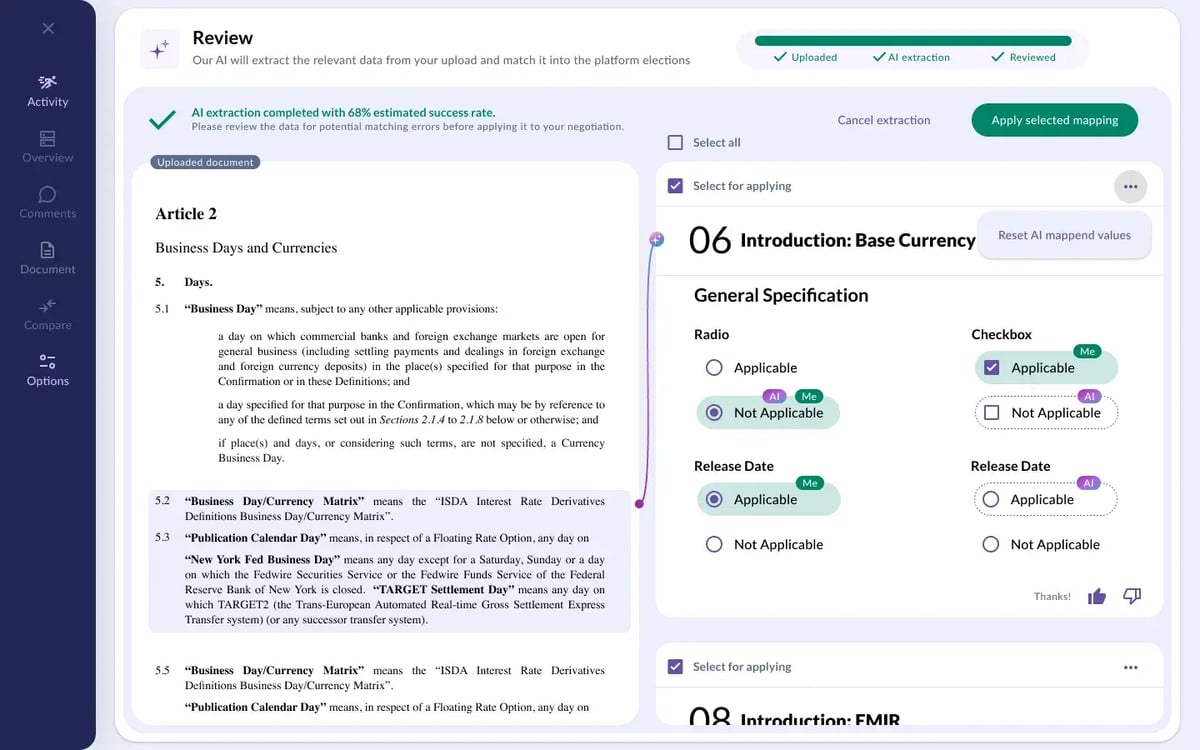
- Extraction Review: asks you to check all AI extracted elections and to decide which election mapping you want to either accept or modify prior to applying them to the final digital copy of your executed agreement.
💡 Note: CiQ Extract assumes the document has been executed offline. You will not be able to use our e-signature workflows on offline negotiations where Extraction has been used.
💡 Give it a try? You have full control over what AI-extracted elections are mapped to your negotiation. If you are curious about how Extraction works, you can run the extraction, check how well CiQ Extract did and then choose to not select any elections for mapping. It will revert you back to your standard offline negotiation view.
Why is CiQ Extract not enabled for my offline negotiation?
It's likely one of these reasons:
- Your organisation (or if you are an advisor - your client) has opted out of the use of AI powered functionality
- Your specific document or template hasn't been set up in CreateiQ Extract
Please contact customer support and we will be able to advise on next steps.
Do I have to use CiQ Extract?
No. It's a premium function that we have built for you, but you don't have to use it. For the best efficiency and data outcomes we always recommend getting your counterparty to do the whole negotiation and signing workflow on CreateiQ. If they insist on taking the agreement offline you can use CiQ Extract to bring it back online or you can choose to continue using manual offline negotiations flow.