
Reserved elections allow you to fill in an election with positions that cannot be changed by the counterparty - a useful tool for any non-negotiables.
💡 If you are a Super Manager or Manager user, then you can reserve elections in any template or draft invitation. To find out more about user roles, check out this article here.
How do I mark an election as reserved?
To mark an election as reserved, first populate the election with your desired position. Then click on the three dots in the top right of the election and select Mark as reserved and Confirm.
All reserved elections must be marked as reserved in the draft invitation stage. This is before the document has been sent to your counterparty.
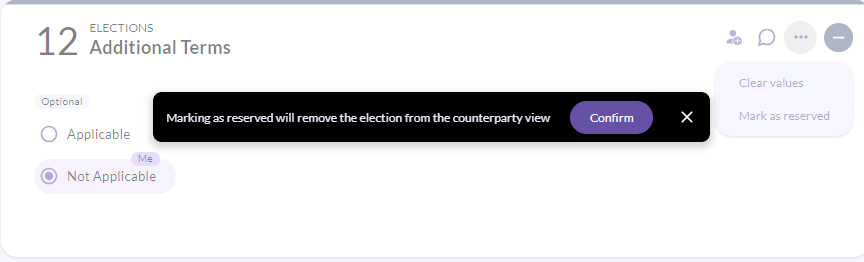
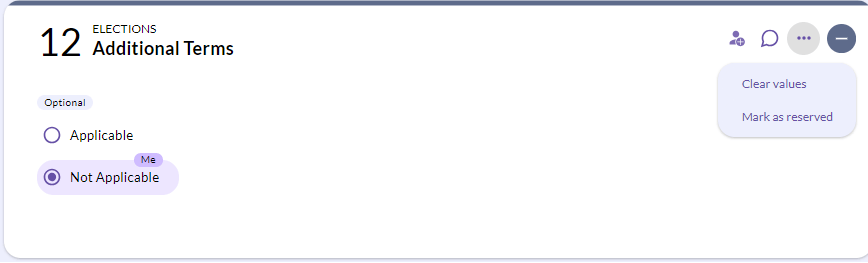
Once you have reserved the election it will be marked with a Reserved banner. Your counterparty won't see this.

What will my counterparty see?
When you send the document to your counterparty, the election will be automatically removed from their view.
The position that you input into the reserved election will remain within the document, but your counterparty will not be able to amend this and propose a position on their end.
💡 Your counterparty won't be able to see the election, but the position that has been input will still be visible within the document itself.
Can I unreserve the election?
Yes!
You can choose to unreserve the election at any time during the negotiation with your counterparty. This will make the election visible to your counterparty the next time you return the document to them. This means they will be able to amend the election and propose a different position.
Can I mark an election as reserved after the document has been sent to my counterparty?
Once the document has been sent to your counterparty it is no longer possible to mark elections as reserved.
💡 The reserve election feature is available to bespoke digitised documents only. This feature is not available in standard ISDA and ISLA published documents. For more information about reserving elections please contact us at support@createiq.tech.