Choosing your document
All documents available to you can be viewed in the Documents tab.
Stages of a negotiation
On CreateiQ, negotiations typically occur in three stages: Draft, Negotiation and Execution:
Draft: Start the negotiation process by going through the document and populating the elections with the terms you wish to send to your counterparty.
Negotiation: Once your document has been sent to your counterparty it will then move into the negotiation stage. Your progress in the negotiation can be quantified by the percentage given in the progress bar at the top of the screen (shown below). Here, it is a back-and-forth, turn based negotiation.

Execution: After all your hard work, you can finalise and execute your document. The execution stage may differ slightly depending on the document type and workflow (for custodian/triparty flows, check out our execution guide here).
There are two ways to start a new negotiation
To start a negotiation you have to send an initial 'invitation' to negotiate.
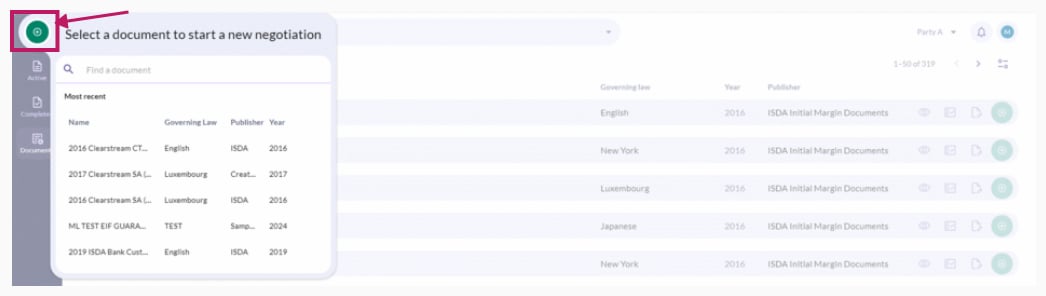
Quick starting a negotiation (via the green Create Negotiation button)
To quick start a new negotiation, select the green Create Negotiation button. A side tab will appear, where the most recently used documents will be shown at the top. You can also start typing into the search bar to bring up relevant documents. Select the document you wish to negotiate.
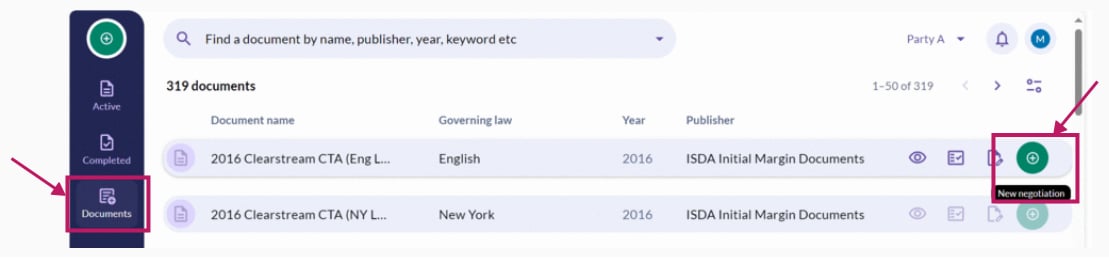
You can also start a new negotiation by clicking on the Documents tab and selecting the green New negotiation button beside the document you wish to start drafting. Again, you're also able to use the search bar to quickly bring up documents.
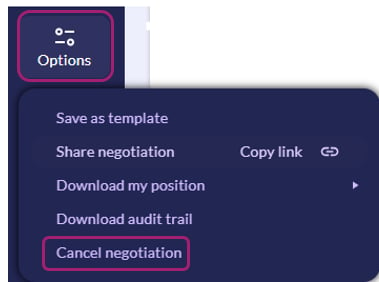
💡 Do you need to delete your draft document? Click on Options in the left hand menu and select Cancel negotiation.
Note: by cancelling your draft document, you are deleting it and you will not be able to retrieve this in the future.